


Bright: Loans & Credit Builder
4.615.25K Reviews
App Specs
- Version
- 1.61.1
- Updated On
- License
- Free
- Downloads
- 1,000,000+
- Developer
- Bright Money
- Categories
- Finance
- Platform
- Android, iOS
Screenshots

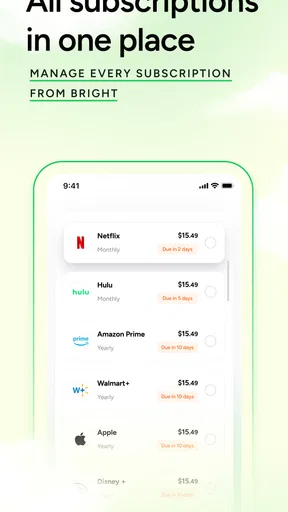
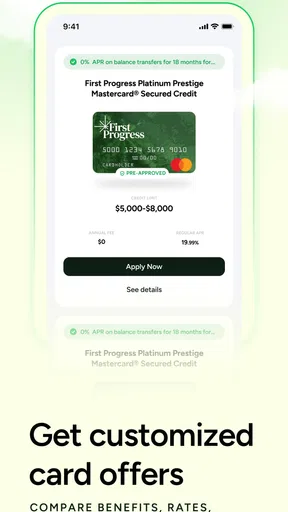
 Analysis by AppCompare
I’m cautious about finance apps that promise to make complicated money decisions feel effortless. A credit score can be confusing, and a loan can have consequences long after the application is closed, so I want more than a tidy screen: I want a tool that helps me slow down, understand my choices, and decide what actually fits. Bright: Loans & Credit Builder is aimed at people who want credit-building guidance alongside access to borrowing and credit cards. Its focus makes it more specific than a general-purpose money tracker, but it also means it is best approached as a practical assistant, not as a substitute for careful financial judgement.
A finance app with a focused job
Bright is a free finance app from Bright Money, released in 2020. It has a 4.6 average from around 150,000 ratings, with more than a million installs, and its content rating is Everyone. The current version is 1.59.3, and it requires Android 8.0 or later. Those details give a useful sense of its reach and compatibility, but they don’t tell me whether a particular loan or credit option is right for an individual; that still depends on the terms presented to that person and their own circumstances.
What I find useful about its central idea is the connection between credit-building and borrowing. Many people treat a score as a number to check occasionally, then think about loans only when money is tight. Bright brings those subjects together, which can encourage a more deliberate routine: understand your credit position, consider whether borrowing is necessary, and think through the longer-term effect before acting. That joined-up perspective is more relevant to someone trying to establish healthier habits than a tool that only displays a balance.
Readable screens and a calmer way to navigate
In my experience, the best financial interface is one that makes the next decision clear without making the whole subject seem trivial. Bright’s presentation is described as clean and straightforward, and that matters when the user is already anxious about a score, a bill, or an application. A simple layout can reduce the effort of finding the relevant information, especially for someone new to credit. Still, clarity is not the same as completeness: I would take time to read any terms and explanations in full rather than treating a neat summary as the whole story.
For readers who find finance language difficult, I’d use the app in small passes instead of trying to master every section in one sitting. Start with the credit information that relates to your immediate question, note any unfamiliar terms, and return to the loan choices only when you can give them your full attention. This approach can make an unfamiliar topic feel more manageable without assuming that every user reads at the same speed or has the same level of financial confidence.
Different abilities, different situations
Ease of use also depends on how someone interacts with a phone. A clean interface may help people who prefer fewer visual distractions, while the overall value of any finance app can vary for users with low vision, limited dexterity, hearing differences, or cognitive fatigue. I wouldn’t assume that a simple design automatically solves those needs. If small text, dense explanations, or rapid prompts make it hard to review a financial choice, use the phone’s own display and interaction settings where they help, and give yourself time to check the information before committing.
There’s also a practical difference between checking a score at home and opening a financial app while standing in a queue or travelling. I’d save loan comparisons and important decisions for a quieter moment, when I can concentrate and read carefully. A quick glance may be enough to orient yourself, but it is a poor setting for weighing repayment obligations. That distinction is especially helpful for anyone who shares a device, has an unpredictable schedule, or needs a little more time to process financial information.
Worth Reading Before You Choose

EA SPORTS FC Mobile 26 Is a Bigger Football Game, but It Takes Time

Flipboard Shows What News Apps Must Do Beyond the Feed

Switching to Android Auto Means Rethinking Your Driving Routine

Google Calendar Makes a Crowded Week Easier to Manage

Ludo King Makes the Most of the Minutes Between Plans

Baby Panda World Brings Quick Play to Modern Phones, but Its Game Library Feels Busy
Where a little caution helps
Bright’s mix of credit support and borrowing can be useful, but it can also tempt someone to treat an available loan as the natural next step. I’d separate the question “Can I apply?” from “Does borrowing solve the problem at a reasonable cost?” Before moving forward, compare the repayment amount and timing with your regular income and essential bills, and consider what happens if an unexpected expense comes up. If the terms do not feel clear, pause rather than relying on a general impression of the app.
People looking for investment research, detailed portfolio tools, or a full replacement for a bank account may be better served by other kinds of financial services. Bright’s appeal is its credit-and-loan emphasis, not a promise to cover every money task. Likewise, a person who already has a dependable credit routine and simply wants a basic spending ledger may prefer a simpler tracker. Choosing a narrower tool is not a drawback if it better matches the job at hand.
Getting Started with Bright
First things first, downloading Bright: Loans & Credit Builder was a breeze. Just a quick tap on the Google Play Store (or the App Store if you’re team iOS) and you’re ready to roll. The setup process was pretty straightforward, like setting up any other app, but what struck me was the simplicity of the UI. It’s clean, intuitive, and doesn’t overwhelm you with a million options right off the bat.
The Features That Shine
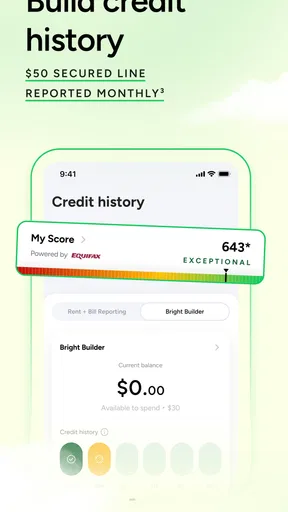
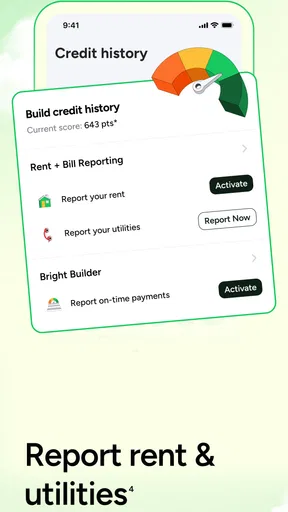
Let’s talk features because that’s where Bright really shines. One of the standout features is the Credit Builder. This is perfect if you’re like me and need a little help understanding the credit game. It’s designed to help you improve your credit score by making smart financial decisions. The app gives you tips on how to manage your spending, which is crucial for maintaining a healthy credit score.
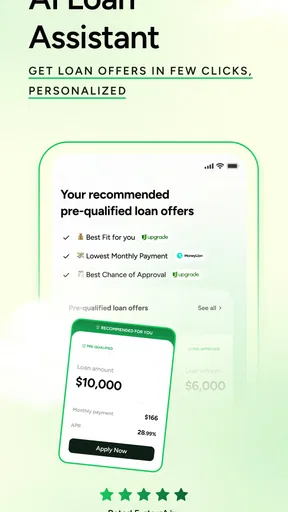
Another feature that caught my eye was the Loans section. Bright offers personal loans with competitive interest rates. What’s cool is that it doesn’t just throw numbers at you. The app takes the time to explain what those numbers mean and how they affect your financial health. It’s like having a financial tutor in your pocket.
Hands-On Experience
Using Bright daily felt like having a dedicated assistant who’s always reminding you to be financially prudent. The app sends notifications for due dates and gives suggestions on how to optimize your expenses. I found the budgeting tools particularly handy. They allowed me to set limits on different categories of spending, and trust me, watching your expenditure stay under budget is a satisfying feeling.
One of the things I appreciated was the transparency of the app. Every transaction, loan term, and credit insight was laid out clearly. There’s no sneaky fine print, and everything is easy to understand, even if you’re not a finance guru.
Making the tools useful in everyday life
The most helpful way I’d use the budgeting side is to choose one category that regularly catches me off guard, set a limit, and check it at a consistent time each week. Trying to control every part of a budget at once can become tiring; focusing first on one flexible expense makes it easier to notice a pattern and decide whether a change is realistic. A spending limit is a prompt to pay attention, not a reason to feel guilty if an essential cost pushes the total higher.
For example, imagine payday is approaching and a car repair has disrupted the month’s plan. I’d use Bright to review the spending picture and see whether a loan deserves consideration, but I wouldn’t apply just because the option is visible. I’d first work out which bills are due before the next paycheque, what amount is genuinely short, and whether the repayment would leave enough room for food, transport, and other essentials. That small calculation can help distinguish a temporary cash-flow problem from borrowing that would make the next month harder.
A useful habit is to treat reminders as checkpoints rather than instructions. When a due-date notification appears, I’d verify that the payment is accounted for and then revisit the budget if the timing has changed. This is more dependable than assuming a notification will resolve the payment automatically. For credit-building, I’d also avoid making several financial changes at once: keeping track of what I changed and when makes it easier to understand which habits are helping and which are adding pressure.
Questions I’d settle before applying
One practical question is whether the app is suitable for someone who has never built credit. I think the guidance-oriented approach can be approachable for a beginner, provided they’re willing to read carefully and treat explanations as a starting point. A new user should not feel obliged to take out a loan to make progress. Learning what affects credit and building a manageable routine are useful goals in their own right.
Another question is whether Bright can replace a bank’s own app. I wouldn’t use it as a substitute for checking the account where income arrives or bills are paid. Its distinctive role is helping with credit-related decisions and money habits; your bank remains the place to confirm account balances and transactions. Using the two for different jobs can avoid confusion, especially when a budget view and an actual available balance are not the same thing.
If someone is comparing Bright with a spreadsheet or a basic expense tracker, the trade-off is guidance versus control. A spreadsheet can be tailored exactly to a household’s categories and may suit someone who enjoys building their own system. A general tracker can be quicker for recording spending. Bright is more compelling when credit-building and loan considerations are part of the same decision, but it may feel like more than necessary if all you want is a simple monthly total.
I’d also ask whether the app is comfortable to use for someone who needs larger text, more time, or a less distracting setting. The answer depends on the individual and the phone, so I’d test ordinary navigation before relying on it for an urgent decision. If reading or selecting controls is difficult, the phone’s accessibility settings may help, but they do not guarantee that every screen or financial explanation will work well for every person. For a high-stakes choice, asking a trusted person to review the terms can be sensible, as long as the final decision remains yours.
Is Bright the Right Fit?
So, who should consider downloading Bright? If you’re someone who's looking to build or repair your credit score, or if you’re just trying to be more financially savvy, this app could be a solid choice. It’s got a little something for everyone, whether you’re a financial newbie or a seasoned budgeter.
However, if you’re someone who's already got a tight grip on your finances and you’re looking for advanced investment options, Bright might feel a bit elementary. But for the everyday person looking to improve their financial literacy, it’s a fantastic tool.
Final Thoughts
In the end, Bright: Loans & Credit Builder is like that wise friend who always steers you in the right direction, financially speaking. It’s practical, easy to use, and genuinely helpful. Whether it’s guiding you towards a better credit score or helping you manage loans, Bright offers a valuable service.
If you’re ready to take control of your financial future and make some smart money moves, I’d say give Bright a shot. You might find it’s just what you needed to brighten up your financial journey.
My inclusive verdict
I’d recommend Bright most readily to someone who wants a focused place to think about credit and borrowing, and who is comfortable checking the details before acting. It can also suit a person who benefits from straightforward navigation and small, repeatable budgeting routines. I would not recommend relying on it alone for complex financial planning, investment decisions, or urgent loan choices made without comparing the repayment commitment against essential costs.
For accessibility, my advice is to judge the actual experience on your own device: can you read the information comfortably, move through the sections at your pace, and understand what a decision will mean later? If yes, the app’s focused approach may make credit feel less opaque. If not, a simpler tracker, your bank’s tools, or support from a qualified financial adviser may be a better fit. The strongest use of Bright is not pressing every available option; it is using the guidance to make a calmer, more informed choice.
Pros
- Easy-to-use interface for quick navigation.
- Automated savings feature helps build savings.
- No credit score impact for checking rates.
- Real-time notifications for financial updates.
- Customizable repayment plans for flexibility.
Cons
- Limited features for non-U.S. users.
- Requires constant internet connection.
- Some features behind a paywall.
- Limited customer support options.
- May not integrate with all banks.
FAQs for Bright: Loans & Credit Builder
What is Bright: Loans & Credit Builder?
Bright: Loans & Credit Builder is a financial app designed to help users manage loans and build their credit score effectively. It offers tools for tracking debts, creating payment plans, and monitoring credit health. The app aims to simplify financial management for users looking to improve their financial stability.
How does Bright help improve my credit score?
Bright helps improve your credit score by offering personalized credit-building strategies. It analyzes your financial habits and suggests optimal payment schedules. Additionally, it provides insights into credit utilization and timely payment reminders, which are crucial for maintaining and improving your credit score.
Is Bright: Loans & Credit Builder secure to use?
Yes, Bright: Loans & Credit Builder prioritizes user security through robust encryption and data protection measures. The app uses bank-level security protocols to ensure that your personal and financial information remains safe. Regular security updates further enhance the app's protection against potential threats.
Can Bright help with loan management?
Absolutely. Bright offers comprehensive tools for managing loans effectively. You can track your loan balances, set up automatic payments, and receive reminders for due dates. The app also provides insights into how different payment strategies can help reduce interest over time, making loan management more efficient.
Is there a cost associated with using Bright?
Bright offers both free and premium versions. The free version includes basic features like credit monitoring and loan tracking. For advanced features such as personalized credit-building strategies and detailed financial insights, there is a subscription fee. Users can choose based on their financial needs and goals.


